Skip to content

Common GoHighLevel Mistakes and How to Fix Them | CRM Automation
Common GoHighLevel mistakes usually begin with rushed planning, unclear CRM structure, and untested automation. Start with a documented customer journey, clean contact organization, defined pipeline stages, and measurable conversion goals. A practical review of CRM automation growth strategies can help teams connect lead capture, follow-up, appointments, and reporting before launching campaigns. GoHighLevel becomes more reliable when every workflow has one purpose, one trigger, and one measurable outcome.
Why GoHighLevel Setup Mistakes Derail Beginners
GoHighLevel setup mistakes derail beginners when teams build features before defining processes. A strong GoHighLevel implementation begins with customer journey mapping, contact fields, permissions, calendars, and pipeline ownership. Record each decision in Documentation so later changes do not create conflicting automations. Test one lead path from form submission through notification, task creation, email marketing, and sales handoff. This approach reduces manual work and exposes configuration issue patterns early.

The GoHighLevel Issues New Users Hit First
Spotting the GoHighLevel issues new users hit first requires checking access, data, triggers, and communication channels in that order. Common problems include missing custom fields, incorrect permissions, duplicate contacts, disconnected forms, and workflows that use the wrong trigger. Create a short diagnostic sheet showing the expected event, actual result, contact record, and timestamp. This evidence makes support conversations faster and prevents guesses. Review every notification, tag, and Pipeline movement with a test record before inviting sales users.

CRM Data Loading Issues
The beginner struggle with CRM data loading issues often comes from malformed spreadsheets, inconsistent phone formats, missing consent fields, and mismatched custom-field types. Before importing, create a backup, remove duplicate contacts, normalize country codes, and test a small batch. Compare record counts before and after import, then inspect ten random records manually. Preserve the original contact export so errors can be reversed without rebuilding the database.
Login Problems and Early Support Tickets
Login problems and early support tickets should be handled with a repeatable access checklist. Confirm the correct login URL, user email, browser session, account permissions, and two-factor authentication method before opening a ticket. Never share passwords in screenshots or email. Record the exact error, time zone, device, browser version, and steps that reproduced it. This information separates an individual access problem from a wider platform incident and helps administrators restore access safely.

How a Rushed Setup Creates Long-Term Friction
How rushed GoHighLevel setup creates long-term friction is visible in inconsistent tags, unclear ownership, oversized workflows, and confusing pipeline stages. A quick launch may appear productive, but every undocumented exception increases maintenance costs. Define naming conventions, folder structures, user permissions, data retention rules, and approval points before building automations. Keep a change log that identifies what changed, why it changed, and which workflows depend on it.

Skipping the Strategy Stage Before Building
Skipping the strategy stage before building causes GoHighLevel features to solve the wrong problems. First identify lead sources, qualification criteria, response-time targets, sales ownership, appointment outcomes, and customer retention moments. Then translate those requirements into fields, tags, workflows, and Pipeline actions. For example, a high-intent form should create a task and immediate confirmation, while an unqualified inquiry may enter a nurture sequence. Strategy prevents redundant automations and protects the Client Experience.
Missing an Account Review Before Going Live
Missing account review before going live leaves hidden defects in forms, calendars, domains, integrations, and user permissions. Conduct a launch review using dummy contacts and real devices. Confirm page links, form mapping, notification recipients, sending domain authentication, SMS consent, calendar availability, and Pipeline ownership. Review failed workflow executions and verify that stop conditions prevent unwanted messages. Obtain sign-off from marketing, sales, and operations before activating traffic.

Five Setup Mistakes That Sink Your CRM
Five GoHighLevel setup mistakes commonly sink CRM setup: unclear ownership, poor contact organization, excessive tags, incomplete integrations, and absent testing. Fix them by documenting the desired customer journey, assigning each Pipeline stage, standardizing fields, limiting tag sprawl, and validating every external connection. Use a controlled launch with a small audience, monitor delivery and conversion data, and keep a rollback plan. Consistent maintenance turns GoHighLevel from a collection of features into an operational system.

Poor Pipeline Organization and Scattered Contacts
Poor pipeline organization and scattered CRM contacts make it difficult to know which leads need attention. Define stages by buyer action rather than internal optimism, such as New Inquiry, Qualified, Appointment Set, Proposal Sent, and Won. Assign one owner, one next action, and one exit rule to each stage. Standardize contact organization with required fields and views so sales users see the same priorities.
Why Duplicate Records Break Lead Segmentation
Why duplicate records break lead segmentation becomes obvious when one person receives conflicting messages or appears in several sales reports. Duplicates often arise from inconsistent email addresses, phone formats, imports, and disconnected forms. Establish a matching rule, review suspected duplicates, merge carefully, and preserve the most complete consent and activity history. Run periodic audits before launching major automations.

Naming Conventions That Save Hours of Cleanup
Naming conventions that save hours of cleanup should cover workflows, tags, forms, calendars, campaigns, and custom fields. Include the business function, audience, channel, and version, such as Sales_NewLead_SMS_v2. Avoid vague labels like Test or Follow-up. Publish the convention in Documentation and require review before new assets go live. Clear names reduce accidental edits and accelerate troubleshooting.

Weak Data Migration from Your Previous CRM
Weak data migration from your previous CRM creates inaccurate segmentation, broken reporting, and lost relationship context. Inventory existing fields, statuses, activities, consent records, and ownership before exporting. Reconcile totals between systems, map values explicitly, and import in stages. Keep legacy identifiers so records can be traced back during validation. A migration is complete only when users can find the right lead, understand its history, and continue the correct workflow.
Fields Lost in the Move and How to Catch Them
Fields lost in the move and how to catch them require a field inventory and record-level comparison. Mark each source field as required, optional, obsolete, or derived. Test dates, currencies, dropdown values, consent flags, and multiline notes because formatting errors can silently alter meaning. Compare a sample of records after import and ask sales users to confirm that essential context remains visible.

Map Tags Correctly Before Import
Mapping tags correctly before import prevents old labels from creating confusing automations. Build a translation table that connects legacy tags to approved GoHighLevel tags, consolidates synonyms, and removes obsolete categories. Do not import every historical label automatically; excessive tags create tag sprawl and weaken segmentation. Test the resulting tags against workflow conditions before importing the full database.

Automation and Workflows: Where Mistakes Hide
Automation and Workflows often hide mistakes inside triggers, branching logic, wait steps, and missing stop conditions. Every workflow should state its entry event, intended audience, actions, exit event, owner, and measurement. Review whether a contact can enter twice, whether replies remove the contact, and whether staff tasks are created when automation pauses. Use small test groups before activating production traffic.
The Temptation to Automate Everything at Once
The temptation to automate everything at once creates fragile dependencies and makes failures difficult to isolate. Begin with one high-value workflow, such as new lead response, and measure speed to contact, reply rate, appointments, and qualified opportunities. After stability is proven, add nurture, reactivation, and customer communications. Automation should remove repetitive work without hiding important human decisions.

Automate the Follow-Up System First
Automate the follow-up system first, not last, because response speed strongly influences lead conversion. Build a sequence with immediate confirmation, a useful follow-up message, a task for the owner, and a respectful pause after engagement. Use email and SMS only with appropriate consent, and stop messages when a reply, booking, or disqualification occurs. Review performance weekly and adjust timing from evidence.

Workflows That Fire Twice and Confuse Leads
Workflows that fire twice and confuse leads usually have overlapping triggers, repeated form submissions, or missing re-entry controls. Audit every entry condition and identify whether a contact can re-enter after completing the sequence. Add duplicate prevention, meaningful tags, and explicit stop conditions. Review execution history for the same contact and timestamp, then test both first-time and returning visitors.
Broken Integrations That Quietly Stall the Customer Journey
Broken integrations that quietly stall the customer journey can leave forms, payments, calendars, and notifications disconnected while the CRM appears normal. Create an integration inventory with owner, purpose, authentication method, last successful sync, and failure alert. Test each integration after platform updates, credential changes, and field edits. A failed connection should create an actionable alert rather than silently losing leads.

External Tools That Stop Syncing After Updates
External tools that stop syncing after updates often fail because an API permission, field name, webhook, or authentication token changed. Compare the last successful event with the first failure, inspect logs, and replay a safe test payload. Avoid changing several variables simultaneously. Document the fix and add a monitoring check so the same issue is detected within hours rather than weeks.

Calendar and Payment Integrations Worth Re-Checking
Calendar and payment integrations worth re-checking include availability rules, time zones, confirmation messages, payment status, refunds, and failed transactions. Book a test appointment from a mobile device and verify that the correct Pipeline stage, owner, reminder, and calendar event appear. Process a controlled payment or sandbox transaction, then confirm the contact record and follow-up workflow update correctly.
Funnel Structure, A2P 10DLC and Email Deliverability Traps
Funnel Structure, A2P 10DLC registration and email deliverability traps can reduce conversions even when the offer is strong. Align each page with one intent, verify consent language, authenticate the sending domain, and monitor bounce and complaint rates. SMS campaigns need compliant registration and clear opt-in records.

Building Funnels Without a Structure Plan
Building funnels in GoHighLevel without a clear structure plan is one of the most damaging mistakes because it quietly breaks automation downstream. When pages, forms, calendars, and pipelines are assembled ad hoc, the workflow triggers either never fire or fire in the wrong order, so leads land in the wrong pipeline stages or sit untouched. Start with a simple map that defines the funnel goal, the single conversion action, and the exact trigger points that push a contact from one stage to the next. Decide up front which form fields map to custom fields, which tags mark entry and exit, and where the workflow hands off to a human. Without this blueprint, attribution collapses, duplicate contacts multiply, and reporting becomes guesswork. A written structure also makes it far easier to add email marketing, SMS, and booking steps later without rebuilding everything from scratch. Treat the funnel plan as documentation your whole team can follow, not a one-time sketch.
Too Many Steps Between the Click and the Conversion
Every extra step between the click and the conversion costs you leads, and GoHighLevel funnels are especially prone to this because it is so easy to add pages, forms, and survey questions. Audit your funnel and count each required action, then remove anything that does not directly move someone toward booking an appointment, submitting a form, or making a purchase. Common culprits include optional survey pages, redundant confirmation screens, lengthy qualification forms, and calendar booking flows that ask for the same information twice. Aim for three steps or fewer from ad click to conversion, and prefill known data using custom fields and URL parameters so contacts never retype what the CRM already stores. Where possible, replace a full form with a two-field form plus progressive profiling inside your automation. Test each reduction against your baseline conversion rate before making it permanent. Fewer steps mean less friction, higher completion rates, and cleaner data entering your pipeline.
Mobile Layouts That Fall Apart
Most funnel traffic arrives on phones, yet mobile layouts are where GoHighLevel builds most often fall apart, and that broken client experience directly reduces conversions. Build and review every page at mobile width first, since desktop is the exception, not the default. Watch for elements that overlap or push content off screen, buttons that are too small to tap reliably, text that requires zooming, pop-ups that trap people with no visible close button, and forms whose fields trigger the wrong keyboard type. Test the full customer journey on a real device, not just a browser resizer, including the booking calendar and any SMS confirmation links. Check load speed as well, because heavy images and unnecessary scripts make mobile visitors bounce before the page even renders. Fixing these issues usually means simplifying rather than redesigning: shorter forms, larger tap targets, single-column layouts, and clearing space around the primary call to action. A funnel that feels effortless on a phone will outperform a prettier one that frustrates.
A2P 10DLC Registration Delays and Message Filtering
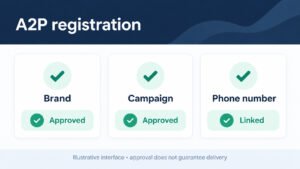
A2P 10DLC registration is one of the most common causes of stalled SMS automation in GoHighLevel, and teams often discover the problem only after a campaign fails. Carriers require brand and campaign registration before application-to-person messaging is allowed, and the review can take days or even weeks, so start the process the moment you decide to use SMS. Missing or inconsistent business details, vague campaign descriptions, and mismatched sample messages are the usual reasons for rejection, and each rejection restarts the clock. Even after approval, your messages can be filtered if your content looks promotional, if opt-in language is weak, or if you send identical texts at volume without stop conditions. Add clear consent language at every collection point, register your sending domain for email in parallel, and keep message samples accurate to what you will actually send. Confirm the A2P 10DLC status of every sub-account before promising clients SMS follow-up.
Common Rejection Reasons and How to Avoid Them
Common rejection reasons and how to avoid them include incomplete business details, inconsistent brand information, unclear SMS consent, prohibited content, and missing privacy disclosures. Use the same legal business identity across registration, website, and messaging profile. Capture opt-in source, timestamp, language, and phone number. Keep sample messages specific and explain how recipients can opt out.
Why Email Deliverability Suffers Without Warmup
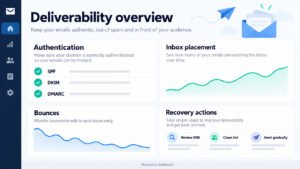
Why email deliverability suffers without warm-up is explained by sudden volume, weak engagement, unauthenticated domains, and purchased lists. Configure SPF, DKIM, and DMARC, begin with engaged contacts, increase volume gradually, and suppress hard bounces. Monitor inbox placement, complaints, replies, and unsubscribes rather than relying only on opens. Clean data protects the sending reputation.

Testing, Tags and Performance Tracking
Testing, Tags and Performance Tracking reveal whether GoHighLevel is producing reliable business outcomes. Define a test matrix covering forms, workflows, emails, SMS, calendars, payments, tags, permissions, and mobile pages. Connect each test to a measurable event such as qualified lead, appointment, or revenue opportunity. Review failures before enabling traffic and keep screenshots in the account Documentation.

The Cost of Never Testing Automations
Skipping test automations is a quiet, expensive habit because GoHighLevel workflows will happily run with a misconfigured trigger, a missing stop condition, or a stale email template, and nobody notices until leads are affected. Always run a complete test contact through the workflow before publishing, then watch every step: does the trigger fire, does the right tag apply, does the contact land in the correct pipeline stage, do the emails and SMS arrive with the right content and timing? Use a dedicated test contact with your own email and phone so you can confirm delivery, check the calendar and booking flow, and verify the stop condition actually ends the sequence. Testing also surfaces duplicate contacts, broken permissions, and integrations that silently disconnect. Build a short pre-launch checklist and re-run it after every edit, because small changes can break big sequences. Teams that treat testing as part of the build, not an optional extra, catch these problems in minutes rather than losing leads for weeks.
Test Workflows with Dummy Contacts Before Launch
Test workflows with dummy contacts before launch by creating records that represent new leads, existing customers, replies, bookings, cancellations, and unsubscribes. Observe every action, wait step, notification, tag, and Pipeline movement. Confirm that internal users receive tasks while contacts receive only intended messages. Delete or clearly label test records so they do not distort reports.

Check Tags Fire in the Right Order
Check tags fire in the right order every time by tracing a contact through the workflow execution history. A qualification tag should not be applied before the required form, reply, or appointment event occurs. Remove conflicting tags when status changes and prevent old labels from triggering new campaigns. Test rapid events and delayed responses because timing often exposes logic errors.

Performance Tracking Without a Scoring Plan
Performance tracking without a real scoring plan produces attractive dashboards but weak decisions. Define lead stages, scoring events, attribution rules, response-time targets, and revenue outcomes first. Separate activity metrics from business metrics: messages sent are activity, while qualified opportunities and collected revenue are outcomes. Review data quality before trusting comparisons across campaigns or sales representatives.
Metrics That Actually Predict Revenue
Metrics that actually predict revenue include speed to first response, qualified-lead rate, appointment show rate, opportunity-to-close rate, average sales cycle, and revenue by source. Segment results by campaign, owner, Pipeline stage, and customer type. Use a consistent attribution window and investigate sudden changes rather than celebrating every spike. These measures show where automation improves or harms conversion.

Dashboards Your Team Will Open Daily
Building dashboards your team will open daily means showing only decisions users must make. Sales needs overdue tasks, new leads, stalled opportunities, appointments, and response time. Managers need conversion by stage, source performance, pipeline value, and automation errors. Set clear owners for each metric and remove widgets nobody acts upon. A focused dashboard encourages consistent follow-through.

Fixing the Client Experience
Expert fixes for common GoHighLevel mistakes in the client experience begin with observing what customers actually receive. Review confirmation language, timing, personalization, handoffs, booking instructions, and unsubscribe handling from the customer perspective. Remove unnecessary steps and make every automated interaction answer a likely customer question.
Rebuilding a Follow-Up System That Converts
Rebuilding a follow-up system that converts requires matching message timing to buying intent. Send immediate confirmation, provide a relevant next step, assign human ownership, and use later reminders only when they add value. Branch the workflow when a lead replies, books, declines, or becomes inactive. Measure qualified conversations and appointments rather than message volume.

Timing Rules That Respect the Customer Journey
Timing rules that respect the customer journey should reflect urgency, time zones, consent, and prior engagement. Avoid sending several messages in a short interval or contacting a person after they have completed the desired action. Use business-hour windows, quiet periods, and stop conditions. Review timing with real conversation transcripts and adjust based on complaints and replies.

Fallback Paths When a Lead Goes Cold
Fallback paths when a lead goes cold should preserve relevance without creating spam. After several unanswered attempts, reduce frequency, offer a different resource or channel, and move the contact to a re-engagement segment. Create a task for high-value leads and suppress contacts who opt out. Track reactivation separately from new-lead conversion so reporting remains honest.
Aligning Your CRM with a Cleaner Pipeline
Aligning CRM setup with a cleaner pipeline organization gives every team member a shared view of progress. Limit stages to meaningful customer decisions, define entry and exit criteria, require a next action, and assign ownership automatically where appropriate. Connect each stage to relevant workflows without allowing automation to overwrite human judgment. Review stalled records weekly and correct the process causing the delay.

Fewer Stages, Clearer Categories, Faster Handoffs
Fewer stages, clearer categories, faster handoffs are achieved when stages describe observable events rather than vague feelings. Combine redundant stages, use custom fields for detail, and create views for priority, source, and owner. A handoff should include context, next action, deadline, and responsible person. This structure reduces waiting and makes forecasting more credible.

Support Scripts for Common Client Objections
Support scripts for common client objections should help staff respond consistently without sounding robotic. Prepare concise answers for price, timing, trust, implementation effort, and cancellation concerns. Link each response to the correct resource or next action, and allow a human to take over when sentiment is negative. Review conversations monthly and update scripts from recurring questions.
Running a GoHighLevel Audit
Running a GoHighLevel audit: account review and support habits that pay off requires a scheduled examination of data, access, workflows, integrations, messaging, and reporting. Review inactive assets, failed executions, duplicate contacts, sending reputation, permissions, and pipeline aging. Prioritize issues by revenue risk, customer impact, and ease of correction. Keep a dated audit log so improvements can be verified.

A 30-Day Audit Checklist for Busy Teams
A monthly GoHighLevel audit keeps an account healthy without demanding hours, and a 30-day rhythm catches drift before it damages results. Start with the essentials: confirm every funnel and form still submits correctly, check that automations and workflows are firing on schedule, and verify integrations and calendar connections are live. Review A2P 10DLC and sending domain status, then scan for message filtering or deliverability warnings. Look at pipeline stages to confirm contacts are moving, check for duplicate contacts, and clean up tag sprawl that makes segmentation unreliable. Confirm permissions are still correct for every user and that two-factor authentication is enabled on admin logins. Review attribution and reporting so you can see which funnels and campaigns actually produce leads. Finish with maintenance tasks: a contact export as backup, a check of stop conditions in long-running workflows, and a documented list of issues with owners and due dates. Keep the whole review to a repeatable checklist your team can complete quickly.
Weekly Login and Access Checks
Weekly login problems and access checks protect continuity as staff, devices, and responsibilities change. Confirm active users, remove unnecessary access, test two-factor authentication recovery, and review recent sign-ins. Ensure departing team members lose access promptly while approved administrators retain emergency recovery options. Record changes and avoid shared credentials because accountability disappears when many people use one login.
Quarterly Review of Automations and Integrations
Quarterly review of automation and integrations health should examine execution errors, duplicate triggers, API credentials, webhooks, calendars, payment events, message delivery, and workflow performance. Compare current behavior with the original design and retire assets that no longer serve the customer journey. Re-test critical paths after every major configuration change and document the result.

When to Call GoHighLevel Support vs Fix It Yourself
When to call GoHighLevel support vs fix it yourself depends on scope and evidence. Fix naming, field mapping, permissions, and workflow logic internally when the issue is isolated and documented. Escalate platform-wide failures, unexplained data loss, authentication defects, billing problems, or reproducible system errors with timestamps and test records. Avoid repeated random changes because they destroy useful evidence.
If you would rather not troubleshoot alone, our GoHighLevel support services team fixes broken workflows, integrations and deliverability issues for you.

Log Issues with Screenshots and Steps
Logging issues with screenshots and steps makes technical support more effective. Capture the account area, contact identifier, workflow name, trigger, expected result, actual result, timestamp, browser, and reproduction steps. Redact passwords, payment details, and personal information. Include whether the problem affects one contact or an entire segment, then preserve the original state when possible.
Escalation Paths for Data Loading Issues
Escalation paths for CRM data loading issues should protect the source data and establish ownership. Pause dependent imports, preserve the original export, record batch numbers, and identify affected fields. Validate a small correction before rerunning a larger batch. Escalate when records disappear, relationships break, or repeated imports produce inconsistent results. Never overwrite the only backup.

From Beginner Struggles to Long-Term Success
Long-term success with GoHighLevel comes from treating the CRM as a maintained operating system rather than a one-time setup. Standardize processes, measure outcomes, train users, review failures, and improve one customer journey step at a time. Teams that combine disciplined planning with practical automation gain cleaner data, faster responses, and more predictable conversions.

Internal Documentation That Keeps Accounts Healthy
Internal documentation is what turns a fixed GoHighLevel account into long-term success, because undocumented automation breaks the moment whoever built it leaves or forgets the details. Create a single source of truth describing every funnel, workflow, pipeline, and integration, including what each one is supposed to do, which triggers it uses, and what its stop conditions are. Record naming conventions for tags, custom fields, and campaigns so new members can follow the same logic instead of inventing their own. Document the client experience from first click through booking, follow-up, and onboarding, noting who is responsible at each handoff. Include a change log so edits to automations can be traced and reversed, and store credentials guidance separately with proper permissions and backup steps. Review and update the documentation on the same 30-day audit cycle, assigning an owner for each section. Clear documentation reduces manual work, speeds up onboarding, and keeps your marketing automation consistent as the team and account grow together.
Follow Official Guides and Changelogs
Official guides and changelogs should be part of routine maintenance because platform behavior, settings, and integration requirements change. Assign someone to review release notes, compare changes with active workflows, and test critical functions in a controlled environment. Use official documentation for configuration decisions and preserve internal notes explaining any account-specific workaround.

Use Outside Guides Carefully
Outside guides can support a broader research routine when evaluating CRM automation, customer experience, and operational improvements. Treat external resources as input rather than unquestioned instructions: verify claims, test recommendations in a safe account, and record which change produced an outcome.

Build a Repeatable Process for Ongoing Success
Building a repeatable process for ongoing success means turning lessons into checklists, ownership rules, review dates, and measurable controls. Schedule Database Maintenance, verify automations, inspect integrations, reconcile pipeline data, and review customer feedback. Keep changes small enough to evaluate and large enough to matter.
Monthly Reviews That Catch Small Issues Early
Monthly reviews that catch small issues early should inspect failed workflows, bounced emails, unanswered leads, stalled opportunities, duplicate contacts, appointment outcomes, and user access. Compare current metrics with the previous month and select no more than three corrective actions. Assign owners and deadlines, then verify completion in the next review. Small interventions prevent expensive system drift.

Scaling Without Breaking Workflows
Scaling without breaking workflows depends on controlled growth, clear ownership, and observability. Add volume gradually, separate business units where necessary, document reusable templates, and test changes with representative contacts. Monitor delivery, execution errors, pipeline aging, and customer responses as usage increases. Reliable scaling preserves the customer journey while allowing teams to expand campaigns and automations.