Skip to content

GoHighLevel A2P 10DLC Registration Explained: SMS Success
GoHighLevel A2P 10DLC Registration is the single most important step for any business or agency that wants reliable, high-volume SMS in the United States. A2P 10DLC stands for Application-to-Person messaging over 10-digit local phone numbers, and the entire framework is governed by The Campaign Registry in coordination with major Carriers like AT&T, Verizon, and T-Mobile. Without a completed Registration, your messages are treated as unverified traffic and may be blocked, filtered, or throttled before they ever reach a prospect’s inbox. This guide walks you through Brand Registration, Campaign Registration, choosing the right Campaign Use Case, and the A2P 10DLC Verification steps that keep your texting compliant.
Whether you are new to Highlevel or optimizing an existing SMS strategy, understanding how consent, EIN data, and sample messages feed into carrier registration will directly influence your Trust Score, throughput, and overall deliverability. By the end, you’ll know exactly how to get registered and unlock dependable business SMS at scale.
Why A2P 10DLC Registration Decides Your SMS Success in GoHighLevel
A2P 10DLC registration decides whether your GoHighLevel texts get delivered because Carriers no longer accept unregistered 10-digit local phone numbers for commercial traffic. Before this framework, businesses could send from local numbers with little oversight, but spam and phishing complaints forced the industry to adopt a carrier registration model. Today, every message you send runs through a vetting layer tied to your Brand and Campaign. If your Registration is incomplete, your traffic defaults to low-trust status, meaning your messages may be silently filtered or blocked. Highlevel makes the process visible by surfacing registration status inside the platform, but the approval itself comes from The Campaign Registry and the Carriers. A complete Registration gives you a Trust Score that determines how many messages per second you can push and whether MMS is allowed.

Skipping this step isn’t a minor delay; it can shut down your entire Automation funnel because abandoned carts, appointment reminders, and lead follow-ups all depend on deliverability. Registration is not a formality. It’s the gatekeeper to your SMS revenue.
What Carriers Require Before Your Messages Reach Inboxes
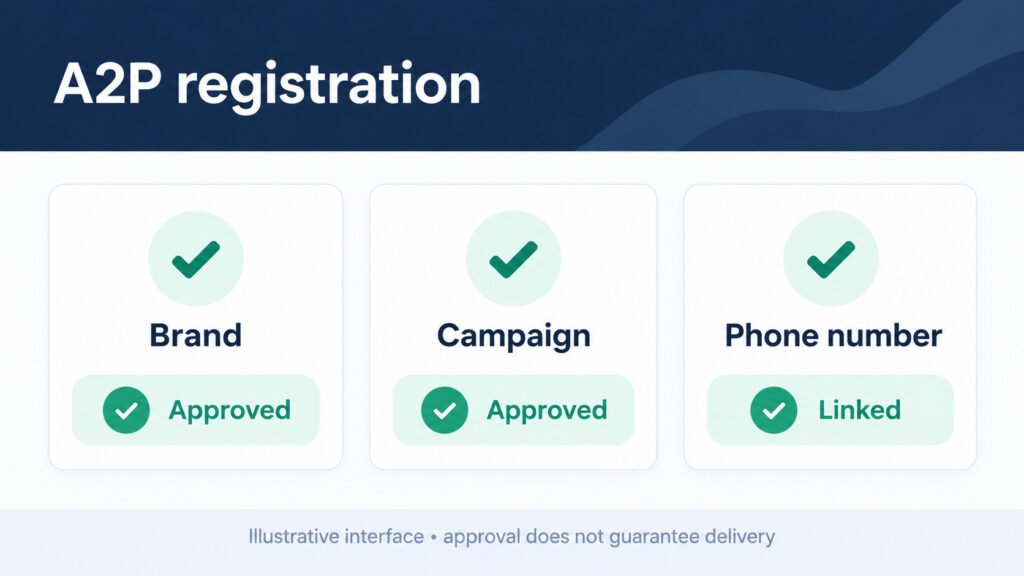
Carriers require a verified Brand, an approved Campaign, and a linked phone number before your messages reach inboxes. AT&T, Verizon, and T-Mobile each enforce their own filtering rules, but they share a common baseline through The Campaign Registry: a legal business identity tied to an EIN, a declared Campaign Use Case, and sample messages that match that use case. Carriers also expect a clear consent flow showing how recipients opted in, plus functional opt-out and HELP responses. If any of these pieces are missing, carriers treat your traffic as high-risk. That means your messages may be diverted to a spam folder or blocked outright. Carriers don’t just look at one message; they evaluate your sending pattern, complaint rate, and historical behavior.

A single rejected Campaign can stall every number attached to it, so it pays to submit accurate Campaign information the first time. Think of carrier requirements as a checklist you must clear before your business SMS gets a green light.
10DLC Registration Requirements Every Sender Must Meet
10DLC Registration Requirements every sender must meet start with a valid EIN and legal business name that match official records. You also need a registered Brand, which is the identity Carriers verify, and at least one approved Campaign describing your messaging purpose. Each Campaign requires sample messages, a consent flow description, and links to your Privacy Policy and Terms & Conditions. You must also register the specific 10DLC numbers you plan to send from and connect them to the approved Campaign. Carriers expect opt-out language like STOP and HELP responses to be functional on every message. Missing any of these elements triggers rejection or delays. Beyond paperwork, you need consistent sending behavior: sudden spikes, high complaint rates, or mismatched content can flag your Campaign even after approval. Registration partners can help, but the legal responsibility stays with your business. Treat these requirements as the foundation of your messaging compliance strategy, not optional extras.
Business Identity Checks That Separate Trusted Senders
Business Identity checks separate trusted senders from risky ones by validating that your Brand matches a real, legally registered entity. The Campaign Registry cross-references your EIN, legal name, and address against authoritative databases. If your information is inconsistent, say your LLC name differs from what you submitted, the system flags your Brand for manual review or rejection. Trusted senders typically have verified websites, matching domain emails, and public records that align with their Brand Registration. These checks exist because bad actors often use fake identities to send phishing or spam at scale. Passing identity verification earns you a higher Trust Score, which unlocks better throughput and fewer filtering delays.

Agencies managing multiple clients should standardize identity data collection to avoid mismatches. A clean identity record also speeds up future Campaign approvals because Carriers already trust your Brand. If your business operates under a DBA, make sure the legal entity behind it is the one registered. Trusted sender status isn’t automatic; it’s earned through accurate, consistent identity data.
How A2P Registration Lifts Your Trust Score and Deliverability
A2P Registration lifts your Trust Score and deliverability by proving to Carriers that your messaging is legitimate and wanted. The Trust Score is a rating assigned to your Brand based on identity verification, Campaign quality, and historical sending behavior. A higher score translates directly into higher throughput, more messages per second, and better inbox placement. When your Registration is complete, Carriers are less likely to filter your messages as spam or phishing. They see a verified Brand and an approved Campaign, which reduces the risk they associate with your traffic. That trust also affects MMS support; some Carriers only enable picture messages for registered, high-scoring senders.

Deliverability is not just about getting through; it’s about getting read. If your messages land in a spam folder, your Automation sequences break and your SMS ROI collapses. Registered senders also get better visibility into delivery errors because Carriers provide richer feedback for verified traffic. In short, Registration is the lever that moves your Trust Score, and your Trust Score controls how well your SMS performs.
How A2P Verification Affects Delivery
A2P Verification directly influences inbox placement because Carriers route verified traffic through higher-trust pathways. When your Brand and Campaign are verified, your messages are less likely to trigger spam filters that divert unregistered traffic. Verification confirms that your consent flow is legitimate and that your sample messages match your actual sending. That consistency signals to Carriers that you’re not a spammer. In practice, verified senders see fewer blocks and faster delivery times. If your Verification lapses or your Campaign is rejected, your messages can be reclassified as unverified, which often means immediate filtering. The link is so direct that many agencies treat Verification status as a leading indicator of SMS performance. You can’t optimize what you can’t deliver, so maintaining active Verification is the baseline for any serious texting strategy. Inbox placement isn’t guaranteed by Verification alone, but without it, you’re fighting an uphill battle against carrier filters.
Why Unregistered Numbers Get Filtered
Unregistered numbers get filtered before delivery because Carriers cannot verify who is sending or whether recipients consented. Without a registered Brand and Campaign, your 10DLC numbers carry no trust signal. Carriers like AT&T, Verizon, and T-Mobile apply aggressive filtering to unknown traffic, often blocking it outright or routing it to a low-priority queue. The filtering happens before delivery, which means your messages never reach the handset. This isn’t a temporary glitch; it’s a deliberate policy to protect consumers from spam and phishing. Unregistered senders also face unpredictable throughput, so even when messages do get through, they may arrive hours late.

For businesses, this translates to lost leads, missed appointments, and damaged customer relationships. Registering your numbers is the only way to remove that filter. Once your Brand and Campaign are approved, your traffic is tagged as verified and bypasses the default blocklist. If you’re still sending from unregistered numbers, your deliverability is effectively zero for commercial messaging.
How GoHighLevel A2P Registration Works Behind the Scenes
GoHighLevel A2P Registration works behind the scenes by connecting your sub-account to The Campaign Registry through integrated registration partners. When you start the process inside Highlevel, you submit your Brand details, legal name, EIN, address, and then create a Campaign that describes your messaging use case. GoHighLevel packages this data and sends it to the registry, which validates it against carrier databases. Once your Brand is approved, you select the Campaign Use Case that best fits your messaging, upload sample messages, and define your consent flow. The platform then links your phone numbers to that approved Campaign.

Behind the scenes, Highlevel also tracks status updates and surfaces approval or rejection reasons in the dashboard. This automation reduces manual paperwork, but it doesn’t bypass carrier rules. You still need accurate data and compliant sample messages. Understanding this pipeline helps you troubleshoot delays and fix rejections faster. Registration isn’t a black box; it’s a defined workflow you can manage.
Registering Your Sub-Account and Phone Number
Registering your sub-account and phone number in Highlevel starts with completing your Brand Registration inside the agency or sub-account settings. You’ll enter your legal business name, EIN, and address exactly as they appear on official documents. Once your Brand is approved, you create a Campaign by selecting a use case, writing sample messages, and describing your consent flow. After the Campaign is approved, you attach your 10DLC numbers to it. Highlevel provides a dedicated registration interface where you can review status, resubmit rejected items, and monitor Trust Score. The phone number itself must be provisioned within GoHighLevel or connected through the platform’s telephony system. If you skip linking the number to the Campaign, your messages remain unregistered even if your Brand is approved. This step is where many users get stuck, so double-check that each number shows an active Campaign association. The entire process is designed to be self-service, but accuracy matters more than speed. A clean sub-account setup prevents downstream rejections.
Choosing the Right Brand Type for Your Legal Identity
Choosing the right Brand type for your legal identity ensures your Registration matches how your business is officially structured. The Campaign Registry recognizes several Brand types, including public companies, private companies, sole proprietors, and non-profits. Each type has different verification requirements. For example, a sole proprietor may register with a tax ID or other accepted identifier, while a private company needs a valid EIN. Selecting the wrong type causes mismatches during identity checks and can lead to rejection.

If your business operates as an LLC, choose the private company type and use the LLC’s legal name and EIN. If you’re a solo operator without an EIN, explore sole proprietor options carefully, as some Carriers impose lower throughput limits on those Brands. Your Brand type also affects how your Campaign is vetted and what Trust Score you can achieve. Getting this right at the start saves you from resubmitting later. When in doubt, match your Brand type to your tax registration documents.
Connecting Your Phone Number to an Approved Campaign
Connecting your phone number to an approved campaign is the step that activates your A2P 10DLC messaging. In GoHighLevel, you assign each 10DLC number to a specific approved Campaign. If you have multiple use cases, say marketing and customer care, you may need separate Campaigns and separate number assignments. The connection tells Carriers which Campaign governs traffic from that number. Without this link, your number remains unregistered and subject to filtering. Highlevel’s interface lets you manage these assignments from the sub-account level, and you can reassign numbers if your Campaign strategy changes.

Keep in mind that changes to Campaign status can affect all numbers attached to it. If a Campaign is suspended, every linked number loses its registered status. So before you connect numbers, verify that the Campaign is fully approved and that your sample messages match what you’ll actually send. This step is straightforward but critical. A properly linked number is the difference between delivered messages and silent failures.
GoHighLevel A2P Registration Steps for Agencies and White-Label Partners
GoHighLevel A2P Registration steps for agencies and white-label partners involve managing multiple Brands and Campaigns across client accounts. Agencies often need to register each client as a separate Brand because the legal identity and EIN belong to the client, not the agency. White-label partners can streamline this by using Highlevel’s bulk registration tools to submit multiple Brand applications at once. The process still requires accurate legal data for each client, but the platform reduces repetitive data entry. Once Brands are approved, you create Campaigns for each client’s use case, appointment reminders, promotions, or transactional alerts, and link their numbers accordingly. Agencies must also decide whether to register under their own Brand or the client’s. Registering under the client’s Brand is usually correct because Carriers want the actual sender identified. White-label options let you keep your agency branding visible in the interface while the underlying registration uses client data. This dual approach maintains trust with Carriers and preserves your agency’s front-end experience. Managing registration across accounts is an operational discipline, not a one-time task.
Bulk Brand Registration Across Client Accounts
Bulk A2P 10DLC brand registration across client accounts lets agencies submit multiple Brand applications efficiently, but each application still requires unique legal data. Highlevel supports bulk workflows that let you upload client information in batches, reducing the time spent on repetitive forms. However, you cannot reuse one client’s EIN or legal name for another; Carriers verify each Brand independently. A common pitfall is copying and pasting data across accounts, which leads to mismatched identity checks and rejections.

Before submitting a batch, standardize your data collection so every client provides the same fields: legal name, EIN, address, website, and consent language. Then use Highlevel’s tools to push those applications through. Bulk registration also means bulk monitoring; you’ll need a process to track which Brands are approved, which are pending, and which need corrections. Agencies that master this workflow can onboard clients faster and avoid the bottleneck of one-by-one registration. It’s an operational advantage that pays off as your client roster grows.
White-Label Options That Keep Your Brand Front and Center
White-Label options that keep your brand front and center let agencies present the A2P Registration experience under their own logo and domain. In GoHighLevel, white-label settings allow you to customize the platform’s appearance so clients see your agency brand during registration. This doesn’t change the underlying legal Brand that Carriers verify, your client’s EIN is still used, but it preserves a seamless client experience. You can also create custom help documentation and support flows that carry your agency branding.

White-label registration is especially valuable for agencies that offer messaging as a core service because it reinforces trust and reduces client confusion. Clients are more likely to complete registration when the interface looks familiar and professional. At the same time, you must ensure that white-labeling doesn’t obscure critical legal disclosures. Carriers require accurate consent language and opt-out instructions regardless of branding. The balance is branding on the front end and compliance on the back end. Done well, white-label options make A2P registration a smoother, more brand-consistent process for every client.
Brand and Campaign Registration: Getting Through Vetting
Mastering Brand and Campaign Registration means surviving the vetting gauntlet that Carriers and The Campaign Registry apply to every submission. The vetting process checks your legal identity, your Campaign Use Case, your sample messages, and your consent flow. Each element must be consistent with the others. If your sample messages talk about promotions but your use case is customer care, reviewers will reject the Campaign. If your consent flow is vague, they’ll ask for more detail. This gauntlet exists to filter out spam and phishing, but it also catches legitimate businesses that submit sloppy applications. The key to mastering it is preparation. Gather your EIN documents, write realistic sample messages, and describe exactly how recipients opt in. Then review everything for consistency before you hit submit. Agencies that treat vetting as a checklist rather than a formality see higher approval rates and faster turnaround. The gauntlet isn’t personal; it’s a quality filter. Once you pass, your Brand and Campaign earn the trust that unlocks reliable SMS. Mastering this stage is what separates professional senders from amateurs.
A2P 10DLC Campaign Vetting and Approval Best Practices
A2P 10DLC Campaign vetting and approval best practices start with selecting the correct Campaign Use Case. The registry offers specific categories like marketing, customer care, and account notifications, each with different expectations. Choose the one that matches your actual messaging, not the one that seems easiest. Next, write sample messages that mirror what you’ll send in production. Reviewers look for clarity, relevance, and compliance language. Include opt-out instructions like ‘Reply STOP to unsubscribe’ and a HELP response.

Your consent flow description should explain exactly how users agree to receive messages, whether through a web form, point-of-sale, or text-to-join keyword. Link to your Privacy Policy and Terms & Conditions. Avoid vague phrases like ‘customers agree to receive messages’ without detail. Finally, double-check that your Campaign information aligns with your Brand. Mismatches between Brand name and Campaign content are a common rejection reason. Best practices aren’t bureaucratic hoops; they’re the signals that get your Campaign approved on the first try. Follow them and you’ll avoid the resubmission loop.
Campaign Approval Checklist Before You Submit
Campaign Approval Checklist before you hit submit ensures you haven’t missed a detail that could trigger rejection. Start with your Brand: confirm it’s approved and that your legal name and EIN match your Campaign. Verify that your selected Campaign Use Case accurately reflects your messaging purpose. Write at least two sample messages that include your brand name, a clear call to action, opt-out language, and a HELP response. Describe your consent flow in specific terms, naming the exact place where users opt in.

Confirm that your Privacy Policy and Terms & Conditions links are live and accessible. Check that your sample messages don’t include prohibited content like misleading claims or restricted industries. Review your throughput needs against the use case you selected; some use cases have lower default limits. Finally, ensure that every phone number you plan to use is ready to be linked. This checklist is your last line of defense against preventable mistakes. Running through it before submission takes minutes but saves days of back-and-forth. A clean submission is a fast approval.
Match Your Use Case to the Sample Messages Reviewers Expect
Matching Campaign Use Case to sample messages reviewers expect is one of the most common failure points in A2P 10DLC registration. If you select a ‘marketing’ use case, your sample messages should clearly be promotional, with opt-out language. If you select ‘customer care,’ your samples should look like account updates or support responses, not sales pitches. Reviewers compare your declared use case against your samples and reject mismatches. They also expect sample messages to include your brand name, a clear description of the message purpose, and standard compliance text. For example, a marketing sample might read: ‘Acme Fitness: 20% off your next class. Reply STOP to opt out, HELP for help.’ A customer care sample might read: ‘Acme Fitness: Your appointment is confirmed for Tuesday at 10am. Reply STOP to opt out.’ The more specific your samples, the easier the review. Avoid placeholder text like ‘Sample message here’ because it signals a lack of preparation. When use case and samples align, approval becomes routine.
Why Brands and Campaigns Get Rejected
When approval stalls, Brand rejection and Campaign rejection reasons usually trace back to inconsistent or incomplete data. Brand rejections often stem from mismatched legal identity, your EIN doesn’t match your business name, or your address is outdated. Campaign rejections frequently involve sample messages that don’t align with the chosen use case, missing opt-out language, or vague consent descriptions. In some cases, Carriers reject Campaigns because the Brand itself is still pending or was flagged for manual review. Understanding these reasons helps you fix issues quickly instead of resubmitting blindly.

The first step after a rejection is to read the reason carefully. Don’t assume it’s a mistake. Check your data against official records, rewrite sample messages to match your use case, and add detail to your consent flow. If the rejection cites ‘brand vetting,’ it may require additional documentation. Most rejections are fixable within a few days. The goal is to correct the root cause, not to flood the system with duplicate applications. Patience plus precision gets you approved.
Fixing a Brand Rejection for Mismatched Legal Identity
Fixing a Brand Rejection tied to mismatched legal identity requires comparing your submitted data against official records and correcting every discrepancy. Start by pulling your EIN letter, business registration, and utility bill or bank statement that shows your legal name and address. Then compare each field in your Brand Registration to those documents. Common mismatches include using a DBA name instead of the legal entity name, entering an old address, or transposing digits in the EIN. Once you identify the mismatch, update your Brand Registration and resubmit.

If your business operates under a different name than its legal entity, register the legal entity and then clarify your DBA in the appropriate field. Some registrations also require a website that matches your Brand; if your site uses a different name, align it or provide additional verification. After resubmission, monitor the status closely and be ready to provide supporting documents if requested. Fixing identity mismatches is tedious but straightforward. Accuracy is the only way to clear this rejection.
Recovering from a Campaign Rejection
Recovering from Campaign Rejection with corrected sample messages means rewriting your examples to match reviewer expectations and your declared use case. Start by reading the rejection reason to see whether the issue is content, missing opt-out language, or a use-case mismatch. Then revise your samples to include your brand name, a clear message purpose, and standard compliance text like ‘Reply STOP to opt out.’ Make sure the samples reflect what you’ll actually send. If your use case is marketing, samples should be promotional; if it’s customer care, they should be informational. Also revisit your consent flow description to ensure it aligns with the samples. Reviewers often reject Campaigns when the consent language is vague or doesn’t match the message type. After corrections, resubmit the Campaign and monitor for approval. If the rejection persists, consider whether your selected use case is truly the best fit; sometimes switching to a more accurate category resolves the issue. Corrected samples are your fastest path back to approval.
Timelines, Support Tickets and 2026 Updates
Timelines, support tickets and 2026 rule updates shape how quickly you can launch and how much flexibility you have. Standard Brand Registration often takes a few business days, while Campaign approval can range from a day to a week depending on vetting volume. If your submission requires manual review, timelines stretch longer. Support tickets become your tracking tool when approval drags past standard windows. You can open a ticket with your registration partner or through Highlevel support to request status updates. In 2026, expect tighter compliance checks and more frequent rule updates from Carriers.

These updates may include stricter consent documentation and additional vetting for high-risk use cases. The best response is to stay informed and build buffer time into your launch plans. Don’t assume last year’s turnaround applies this year. Track your tickets, document your submissions, and keep your data ready for re-verification. Timelines are not just logistics; they affect your marketing calendar and revenue forecasts. Planning around them keeps your SMS strategy on track.
Real Turnaround Times for Registration
Real timelines for Registration and Verification turnaround vary by Brand type, Campaign use case, and carrier workload. In practice, Brand Registration can clear in one to three business days if your data is accurate. Campaign approval typically takes two to seven business days, with marketing use cases sometimes taking longer due to higher scrutiny. Number linking is usually immediate once the Campaign is approved, but propagation across Carriers can add another day. If your submission is flagged for manual review, add a week or more.

These timelines aren’t guarantees; they’re planning benchmarks. Factors like incomplete consent flows, mismatched identity data, or high submission volumes can extend them. To avoid surprises, submit complete applications and monitor status daily. If you’re launching a time-sensitive campaign, start registration at least two weeks in advance. Understanding real timelines helps you set client expectations and avoid last-minute panic. Verification is a process, not an instant switch.
How to Register Quickly Without Cutting Corners
Rushing an A2P 10DLC Registration without cutting compliance corners is possible if you prepare thoroughly before you start. The fastest path is a complete, accurate submission on the first attempt. Gather your EIN, legal documents, sample messages, and consent flow details in advance. Use GoHighLevel’s registration interface to submit everything at once rather than in pieces. Choose the correct Campaign Use Case immediately so you don’t have to resubmit. If you need to accelerate further, consider using a registration partner that has established workflows with The Campaign Registry. They can catch errors before submission. What you should not do is submit incomplete data or use placeholder text just to get in the queue; that triggers rejections and delays you more. Rushing also means monitoring closely and responding to reviewer requests within hours, not days. Speed comes from preparation, not from skipping steps. A clean, complete application is the fastest registration you can get.
Track Support Tickets When Approval Drags
Tracking support Tickets when approval drags past standard windows keeps your registration from disappearing into a black hole. If your Brand or Campaign has been pending beyond the expected turnaround, open a ticket with your registration partner or Highlevel support. Include your Brand ID, Campaign ID, submission date, and any rejection reasons you’ve received. Then follow up at regular intervals, every two to three business days, to request status updates. Keep a log of ticket numbers, agent names, and responses.

This record helps you escalate if needed and prevents you from repeating information. If the ticket stalls, ask for a supervisor or a direct contact at the registry. In some cases, delays are caused by carrier-side manual reviews that support can’t bypass, but they can confirm the status. Patience is necessary, but passive waiting is not. Active ticket tracking shows you’re engaged and helps support prioritize your case. When approval drags, tickets are your visibility tool.
Verification and Compliance Checks to Watch in 2026
A2P 10DLC Verification and compliance checks to watch in 2026 reflect a tightening regulatory environment. Carriers are increasing scrutiny on consent documentation, opt-out handling, and message content. Expect more frequent audits of your sending behavior, including complaint rates and opt-out response times. New requirements may include additional verification for high-volume senders and stricter rules for MMS content. The Campaign Registry is also updating its vetting criteria, so what passed last year may need revision.

To stay ahead, review your registration data quarterly and update any changes in your business identity. Monitor carrier announcements and registry bulletins for new rules. Ensure your opt-out and HELP responses are functional and logged. Compliance isn’t a one-time task; it’s an ongoing discipline. The cost of ignoring updates is rejection, filtering, or suspension. Watching these checks and adapting early protects your Trust Score. In 2026, proactive compliance is the competitive advantage.
New 10DLC Requirements This Cycle
New 10DLC Registration Requirements landing this cycle focus on transparency and accountability. Some Carriers now require more detailed consent records, including timestamps and opt-in source. Others are expanding vetting for specific use cases like lead generation and financial services. You may also see requirements for clearer disclosure of message frequency and data-sharing practices. The registry is updating its Campaign vetting questions to capture more nuance about how messages are sent. These changes mean your existing registration may need updates even if it was approved earlier. Review your Campaign information against the new requirements and revise where necessary. If you use multiple sub-accounts, audit each one. Agencies should communicate these changes to clients and adjust onboarding checklists. The goal is to maintain compliance without disrupting active messaging. New requirements aren’t obstacles; they’re the new baseline. Adapting early keeps your SMS channels open. Ignoring them risks suspension.
Keeping Messaging Compliance Airtight
Keeping messaging compliance airtight as rules tighten requires a systematic approach to consent, content, and monitoring. Start by documenting every opt-in source with timestamps and user details. Store this data securely so you can produce it if Carriers request proof. Review your message templates regularly to ensure they include brand name, opt-out language, and accurate descriptions. Set up Automation in GoHighLevel to handle opt-outs immediately and confirm they’re processed.

Monitor complaint rates and delivery metrics weekly; spikes can signal problems before Carriers act. Train your team on what constitutes compliant messaging and what doesn’t. Keep abreast of carrier announcements and registry updates. If you operate across multiple industries, apply the strictest rules to all campaigns. Airtight compliance isn’t just about avoiding penalties; it’s about protecting your Trust Score and deliverability. As rules tighten, the senders who thrive are those who treat compliance as a core business process, not a checkbox.
Costs, Industries and Real-World Results
Costs, industries, and proven success stories from the field reveal how A2P 10DLC registration translates into real business outcomes. Registration itself involves fees: Brand Registration costs a one-time fee, Campaign Registration has a monthly or one-time vetting fee, and Carriers charge per-message fees that vary by use case. These costs are modest compared to the revenue lost when messages are blocked. Industries like healthcare, fitness, real estate, and retail see strong SMS performance because their messages are timely and personal.

Success stories often start with a rejected Campaign that gets fixed and then delivers predictable revenue. Agencies report that once registration is complete, their clients’ appointment reminders and lead follow-ups run without interruption. The trade-off is clear: investing in registration and compliance yields higher deliverability and better ROI. Cost isn’t just money; it’s the opportunity cost of unregistered messaging. The field evidence shows that registered senders outperform unregistered ones on every metric that matters.
Messaging Cost and Deliverability by Industry
Messaging cost and deliverability trade-offs by industries vary because Carriers apply different rules and fees to different use cases. High-volume industries like retail and entertainment may pay more per message for marketing campaigns, but they also see higher engagement rates. Regulated industries like healthcare and finance face stricter vetting and may need additional consent documentation, which increases setup time. Deliverability is generally better for transactional and customer care messages because Carriers view them as lower risk. Marketing messages often have higher opt-out rates, which can affect your Trust Score if not managed. The trade-off is between reach and risk. To optimize, segment your messaging: use transactional campaigns for critical alerts and marketing campaigns for promotions. This separation can improve deliverability and reduce compliance risk. Understanding these trade-offs helps you budget and set realistic expectations. No industry gets a free pass, but some face lower friction than others. Choose your use cases wisely.
Industries Where SMS Outperforms Email
High-volume industries where SMS outperforms email include retail, fitness, healthcare reminders, and real estate. Industry studies often report SMS open rates above 90%, compared with roughly 20% for email. For time-sensitive messages like appointment reminders or flash sales, texting delivers faster and more reliably. In retail, SMS campaigns drive immediate foot traffic and online conversions. In fitness, class reminders reduce no-shows. In healthcare, appointment confirmations improve attendance.

These industries benefit because their audiences expect quick, personal communication. However, high volume also means higher compliance scrutiny. You must manage opt-outs carefully and keep your Trust Score high. Email still has a role for longer-form content, but for urgent, action-oriented messages, SMS wins. The key is to use registered 10DLC numbers so your high-volume sending isn’t throttled. When deliverability matters, SMS is the channel that gets read.
What Email Deliverability Teaches About SMS
Email deliverability parallels that sharpen your mobile strategy include sender reputation, consent, and content relevance. Just as email providers filter based on sender score and engagement, Carriers filter based on Trust Score and complaint rates. In email, you warm up domains; in SMS, you build Trust Score through accurate registration and consistent sending. Both channels punish sudden volume spikes and high complaint rates.

Email best practices like list hygiene and clear unsubscribe options have direct analogs in SMS opt-out management and consent documentation. You wouldn’t send email without an unsubscribe link, and you shouldn’t send SMS without STOP language. Similarly, personalization and segmentation improve engagement in both channels. The parallel is useful because it gives you a mental model for mobile compliance. If you already manage email deliverability well, apply the same discipline to SMS: monitor metrics, respect consent, and keep your sender identity clean. These parallels make mobile strategy less mysterious and more systematic.
A2P 10DLC Registration in Action
A2P 10DLC success stories show Highlevel A2P Registration in action and demonstrate what’s possible when you complete the process correctly. One common scenario involves an agency that inherited a client with unregistered numbers and failing SMS campaigns. By registering the client’s Brand, creating a matching Campaign, and linking numbers, the agency restored deliverability within a week. For example, a fitness studio sending class reminders by SMS can cut no-shows once its messages stop being filtered. These stories aren’t outliers; they’re repeatable when you follow the steps. The pattern is consistent: accurate Brand data, a well-matched Campaign, and diligent opt-out handling. Agencies that master registration often turn it into a service offering, helping clients navigate the process for a fee. The field evidence confirms that registration is an investment, not a cost. When you get it right, SMS becomes a reliable revenue channel instead of a compliance headache.
How an Agency Can Clear Registration in Days
How an agency can clear Brand and Campaign Registration in days comes down to preparation and precision. The agency collected each client’s EIN, legal name, and address before starting. They drafted sample messages that clearly matched the selected use case and included opt-out language. They described consent flows in specific detail, citing the exact web form and checkbox language. With everything ready, they submitted Brand and Campaign applications back-to-back.

Because the data was accurate, the Brand was approved in two business days and the Campaign in three. They linked numbers immediately and began sending. The agency credits their speed to a standardized intake process and a checklist that prevented mismatches. They also monitored status daily and responded to reviewer questions within hours. This story illustrates that fast approval isn’t luck; it’s the result of doing the prep work. Any agency can replicate this approach by treating registration as a defined project with clear inputs and owners.
From Registration Headaches to Predictable SMS Revenue
From A2P Verification headaches to predictable SMS revenue is a journey many businesses share. The headaches usually start with rejected Campaigns, vague consent descriptions, or mismatched Brand data. Each rejection delays launch and erodes confidence. The turning point comes when you treat verification as a structured process: gather documents, write compliant samples, and submit complete applications. Once approved, the revenue side emerges. Appointment reminders reduce no-shows, lead follow-ups convert faster, and promotional texts drive immediate sales.

Predictability comes from consistency. With a registered Brand and approved Campaign, you know your messages will deliver. You can plan campaigns around that reliability. The headaches fade when you realize that verification isn’t a hurdle; it’s the foundation of a dependable channel. Businesses that push through the initial friction often find that SMS becomes their highest-ROI marketing tool. The transition from frustration to revenue is real and repeatable.
A2P 10DLC Services and Solutions for Every Team
A2P 10DLC GoHighLevel services and solutions for every team range from self-service registration to fully managed compliance. Solo operators can use Highlevel’s built-in tools to register their own Brand and Campaign without outside help. Agencies scaling across clients may prefer managed services that handle bulk registration, vetting, and ongoing compliance. White-label partners can offer registration as part of their service package, keeping their brand front and center. Choosing the right fit depends on your volume, technical comfort, and client expectations. The core requirements remain the same regardless of approach: accurate data, compliant samples, and diligent opt-out handling. What changes is who does the work and how much support you get. Highlevel’s platform supports all models, so you can start simple and expand as you grow. The goal is to match your registration strategy to your operational capacity. No single solution fits everyone, but every team can find a path that works. The right service keeps your SMS compliant and your focus on messaging, not paperwork.
Prefer to hand registration to specialists? Our GoHighLevel support services team handles A2P 10DLC brand and campaign registration, rejections and resubmissions for you.
Choosing A2P 10DLC Help That Fits Your Scale
Choosing A2P 10DLC GoHighLevel services that fit your scale means evaluating your sending volume, number of clients, and internal resources. If you’re a solo operator sending a few thousand messages a month, self-service registration inside Highlevel is likely sufficient. If you manage dozens of client sub-accounts, a managed service or bulk registration tool saves time and reduces errors. Agencies with white-label offerings may want a partner that supports co-branded registration workflows.

Consider your growth trajectory too. A solution that works today may not scale to next year’s volume. Look for services that offer tiered support, from basic submission to full Campaign vetting and monitoring. Cost is a factor, but the cost of failed registration is higher. The right service aligns with your compliance obligations and your client service model. Evaluate options against your actual scale, not an aspirational one. Fit is about matching capacity to need, not buying the most expensive package.
Solutions for Solo Operators
Solutions for solo operators ramping up A2P 10 DLC messaging focus on simplicity and self-service. As a solo operator, you can register your own Brand using your EIN and legal name directly in GoHighLevel. Choose a Campaign Use Case that matches your primary messaging, write compliant sample messages, and link your numbers. Highlevel’s interface guides you through each step, and you can monitor status without outside help.

The main challenge is avoiding common mistakes like vague consent descriptions or mismatched Brand data. Take time to prepare your documents and samples before you start. If you lack an EIN, explore sole proprietor registration options, but be aware of potential throughput limits. Once registered, you can send transactional and marketing messages reliably. Start with lower volumes and scale as your Trust Score grows. Solo operators don’t need enterprise solutions; they need accurate data and a clear process. Self-service registration puts you in control.
Agencies Scaling White-Label A2P Across Clients
Agencies scaling White-Label A2P solutions across clients need a repeatable registration workflow and tools that support multi-account management. Start by standardizing your client intake process so you collect EIN, legal name, address, and consent details consistently. Use Highlevel’s bulk registration features to submit multiple Brands and Campaigns efficiently. White-label settings let you present the registration experience under your agency brand, which builds trust and reduces client confusion. Assign clear ownership for monitoring approvals, fixing rejections, and linking numbers. Track each client’s Trust Score and deliverability so you can intervene early if issues arise. Consider offering tiered service packages: basic registration, managed compliance, or full-service SMS management. As your client roster grows, automation and documentation become critical. You can’t manage dozens of registrations in your head; you need systems. White-label A2P solutions done well turn registration from a bottleneck into a scalable service line that reinforces your agency’s value.
Supporting HELP and STOP Responses
Supporting HELP and STOP responses without breaking compliance is a non-negotiable part of A2P 10DLC messaging. Every campaign must respond to STOP with an opt-out confirmation and to HELP with a support message. These responses must be functional and timely; Carriers monitor them as signals of compliance. In GoHighLevel, you can configure Automation to handle these keywords automatically. When a recipient texts STOP, the system should remove them from all future messages and send a confirmation. When they text HELP, the system should reply with your support contact and a brief description of your program.

Failing to honor opt-outs or leaving HELP unanswered can trigger complaints, which damage your Trust Score and may lead to Campaign suspension. It’s not enough to have these responses; you must audit them regularly to ensure they work. Compliance here is simple but strict: respect the opt-out, answer the help request, and log the interaction. These small actions protect your entire SMS operation.
Automating Opt-Out Handling in GoHighLevel Workflows
Automating opt-out handling in GoHighLevel workflows ensures that every STOP request is processed immediately and consistently. You can build a workflow that triggers when a contact sends STOP, tags the contact as opted out, and removes them from all SMS campaigns. The workflow should also send a confirmation message like ‘You have been unsubscribed. Reply HELP for help.’ This automation prevents human error and ensures compliance with carrier rules.
Need these automations built and tested properly? See our GoHighLevel workflow automation service.

Beyond the initial response, your workflow should suppress future messages across all campaigns, not just the one that triggered the opt-out. Carriers expect global opt-out handling. Test your workflow regularly by sending STOP from a test number and verifying that no further messages are delivered. Also handle variations like ‘stop,’ ‘STOP,’ and ‘Stop all’ if your system supports them. Automation makes opt-out compliance scalable, but it must be configured correctly. A broken opt-out workflow is a compliance risk and a Trust Score killer. Set it up once, verify it often.
Auditing HELP and STOP Responses
Auditing HELP and STOP responses to protect your Trust Score means regularly testing and reviewing your automated replies. At least monthly, send STOP and HELP keywords from a test device and confirm that the responses are correct, timely, and compliant. Check that STOP triggers a global opt-out and that HELP provides a valid support contact. Review logs to ensure no opted-out contacts received further messages. If you find gaps, fix them immediately and document the correction. Carriers may request evidence of your opt-out handling during audits, so maintain records. Also monitor complaint rates; a spike often indicates opt-out failures. Train your team on the importance of these responses and assign ownership for audits. Protecting your Trust Score is an ongoing effort, and HELP/STOP handling is a critical part of it. A single overlooked opt-out can cascade into filtering or suspension. Regular audits keep your compliance airtight and your messaging reliable.
Final Checks and Your Next Registration Step
Final checks and your next registration move bring everything together into a clear action plan. Before you launch, revisit the key steps: Brand Registration, Campaign approval, number linking, and opt-out automation. Use the checklists in this guide to verify that each element is complete. Then explore related articles on messaging compliance and carrier rules to deepen your understanding.

Your next move depends on your current status. If you haven’t started, gather your EIN and legal documents today. If your Brand is approved but your Campaign is pending, review your sample messages for alignment. If you’re fully registered, audit your HELP and STOP responses and monitor your Trust Score. Registration is not the end; it’s the beginning of ongoing compliance. Stay informed about 2026 updates and adjust as needed. With a complete registration and a compliance mindset, you can unlock reliable, high-volume SMS in GoHighLevel. Take the next step now, and make your messaging a dependable revenue channel.
Where to Keep Learning About A2P 10DLC
Official sources and compliance guides can help you stay current as rules evolve. Look for guides on The Campaign Registry’s vetting criteria, carrier-specific requirements for AT&T, Verizon, and T-Mobile, and best practices for consent documentation. Articles on Trust Score optimization and throughput management are also valuable. GoHighLevel’s own knowledge base offers step-by-step registration walkthroughs and troubleshooting tips.

Industry blogs and forums can provide real-world examples and the latest A2P 10DLC updates. However, prioritize official sources for compliance-critical information. Bookmark registry bulletins and carrier announcements. If you’re an agency, consider subscribing to compliance newsletters to receive changes directly. Reading widely helps you anticipate shifts rather than react to them. The more you understand the framework, the better you can navigate rejections and audits. Continuous learning is part of maintaining a healthy SMS channel. Use these resources to build your expertise over time.
Official Guidance on Compliance and Carrier Rules
Official guidance on messaging compliance and carrier rules covers topics like opt-out enforcement, consent record-keeping, and content restrictions. Start with The Campaign Registry’s official documentation on Campaign vetting and use cases. Then read carrier-specific guidelines from AT&T, Verizon, and T-Mobile, which detail their filtering practices and prohibited content. Articles on TCPA compliance and consent best practices are also essential because legal requirements underpin carrier rules. For agencies, white papers on managing multi-client registration and bulk vetting are valuable. GoHighLevel’s blog and help center offer practical tutorials on configuring opt-out Automation and auditing HELP responses. These articles translate policy into action. Prioritize sources that are updated regularly, as rules change. Reading them isn’t just about avoiding penalties; it’s about building a messaging program that earns trust. The more informed you are, the fewer surprises you’ll face. Make compliance reading a habit, not a one-time task.
Where to Find A2P 10DLC Updates
Places to find A2P 10DLC updates include official registry bulletins, carrier announcement pages, and industry compliance blogs. The Campaign Registry publishes updates on vetting criteria and new requirements. AT&T, Verizon, and T-Mobile each maintain developer or business messaging pages with carrier-specific changes. GoHighLevel’s community forum and release notes often highlight platform updates related to A2P registration.

For agencies, subscribing to compliance newsletters and joining professional messaging associations can provide early warnings. Social media groups for Highlevel users also share practical updates and workarounds. However, verify critical information against official sources. Set a recurring calendar reminder to check these channels monthly. Rules can change without fanfare, and missing an update can lead to rejection or suspension. Being proactive about updates keeps your registration current and your Trust Score stable. In 2026, information is a compliance tool. Stay plugged in.
Your 7-Step A2P 10DLC Registration Checklist
Your 7-Step A2P 10DLC Registration checklist before you launch ensures you’ve covered every requirement. Step one: gather your EIN, legal name, and address. Step two: complete Brand Registration with accurate data. Step three: select the correct Campaign Use Case. Step four: write sample messages that match that use case and include opt-out language. Step five: describe your consent flow with specifics. Step six: submit your Campaign and monitor for approval. Step seven: link your 10DLC numbers to the approved Campaign and configure STOP/HELP Automation.

This checklist isn’t just for first-timers; even experienced senders benefit from a final review. Missing any step can delay launch or cause rejection. Before you consider the process complete, verify that your opt-out handling works and that your Privacy Policy and Terms & Conditions links are live. Then run a test message to confirm delivery. With these seven steps done, you’re ready to launch compliant, high-deliverability SMS in GoHighLevel. The checklist turns a complex process into a manageable sequence. Follow it, and you’ll avoid the most common pitfalls.
Final Campaign Approval Checklist
Final Campaign Approval Checklist for a clean submission focuses on the details reviewers scrutinize most. Confirm that your Brand is approved and that your Campaign data matches it. Verify that your sample messages align with your selected use case and contain brand name, opt-out, and HELP language. Ensure your consent flow description is specific, naming the exact opt-in mechanism. Check that your Privacy Policy and Terms & Conditions links are functional. Review your throughput needs against the use case. Double-check that every phone number you plan to use is ready for linking. Avoid placeholder text and vague statements. If you’re unsure about any field, err on the side of more detail, not less. A clean submission minimizes back-and-forth and speeds approval. This checklist is your last quality gate before the Campaign goes to reviewers. Run it every time you submit, even for familiar use cases. Clean submissions are approved faster and with fewer headaches.
Avoid the Most Common Rejection Reasons
Avoiding the most common Rejection Reasons one more time means reinforcing what trips up most applicants. Mismatched legal identity tops the list; your Brand name and EIN must match official records. Vague consent descriptions are another frequent cause; reviewers want specifics, not generalities. Sample messages that don’t match the declared use case are also common rejections. Missing opt-out or HELP language in samples triggers rejection. Incomplete Privacy Policy or Terms & Conditions links cause delays.

Use of prohibited content, such as misleading claims or restricted industries, is another. Finally, duplicate submissions or resubmitting without changes waste time. To avoid these, prepare thoroughly, review your data against official documents, and write samples that clearly reflect your use case. If you do get rejected, fix the root cause before resubmitting. Understanding these reasons helps you sidestep them. A little prevention saves days of delay. Keep this list handy before every submission.