Skip to content

GoHighLevel Email Deliverability: Fix Spam Fast
GoHighLevel email deliverability improves fastest when authentication, list quality, sending volume, and content are corrected together. Verify SPF, DKIM, and DMARC, test with Mail-Tester, pause risky campaigns, and rebuild sender reputation gradually.
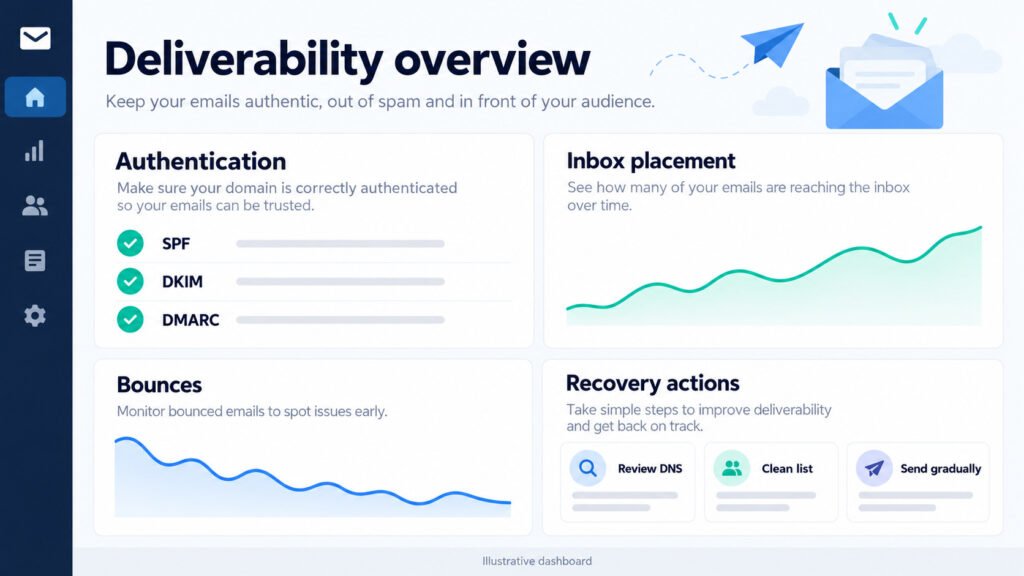
Why GoHighLevel Emails Land in Spam: 7 GHL Spam Causes
Why GoHighLevel emails land in spam usually comes down to weak authentication, poor engagement, invalid addresses, sudden volume, misleading content, broken links, or an unverified sending domain. Identify the dominant cause before changing several settings at once.

How a Weak Sending Setup Causes Spam Problems
A weak sending setup causes spam problems when shared infrastructure, missing DNS records, and inconsistent authentication create uncertainty for mailbox providers. Align the sending domain, provider, and visible From address before scaling campaigns.
A Missing or Broken Mailgun Connection
Missing or broken Mailgun connection services can interrupt authenticated transmission, produce bounces, and create delivery challenges. Confirm the connection is active, credentials are valid, domains are authorized, and event logs show accepted messages before restarting automation.
A Workflow Fired Without a Verified Sending Domain
A workflow fired without a verified sending domain may send from an untrusted identity. Check the workflow trigger, From address, domain verification, and test contact; then inspect the message headers to confirm authenticated delivery. Our GoHighLevel workflow automation service builds and tests these triggers for you.
Content and List Health Signals That Raise Spam Flags
Content and list health signals that raise spam flags include high complaint rates, inactive subscribers, sudden volume, excessive images, misleading urgency, and poor bounce control. Remove invalid contacts and send relevant messages to recently engaged recipients.

Spam-Triggering Words and Broken Links
Spam-triggering words and broken links in content can reduce trust even when authentication passes. Review subject lines, redirect chains, URL reputation, HTML rendering, unsubscribe visibility, and mobile formatting before sending a larger campaign.
Purchased Lists and Cold Subscribers
Purchased lists and cold subscribers create permission problems, complaints, and weak engagement signals. Use consent-based acquisition, suppress unresponsive contacts, and begin with a small segment whose opens, clicks, and replies demonstrate genuine interest.
Email Authentication Setup: SPF, DKIM and DMARC
Proven email authentication setup combines SPF, DKIM, and DMARC so mailbox providers can verify authorized infrastructure and domain alignment. Publish one accurate SPF record, activate DKIM signing, begin DMARC monitoring, and enforce policy only after legitimate sources pass.

How to Publish the Correct SPF Record for GoHighLevel Emails
How to publish the correct SPF record for GoHighLevel emails starts with identifying every approved sender, including Mailgun and any custom SMTP service. Add required mechanisms to one TXT record, remain below the ten-DNS-lookup limit, and remove obsolete providers.
Reading SPF Syntax and Common Merge Errors
Reading SPF record syntax and common merge errors prevents authentication failures. Keep a single v=spf1 record, avoid duplicate declarations, check include chains, and use a DNS lookup tool after every edit to confirm the published response.
Verifying SPF Alignment After Each Sending Setup
Verifying SPF alignment after each sending setup requires checking the envelope-from domain against the visible From domain. Send controlled tests to major mailbox providers, inspect Authentication-Results headers, and document pass, fail, and neutral outcomes.
How DKIM, SPF and DMARC Work Together
DKIM record, SPF, and DMARC working together for authentication provide complementary protection: SPF validates authorized servers, DKIM signs message content, and DMARC evaluates alignment. Test all three through real messages rather than relying only on dashboard status.
Generating and Rotating the DKIM Record in Settings
Generating and rotating the DKIM record in settings involves creating the provider’s selector, publishing its TXT or CNAME value, and waiting for DNS propagation. Rotate keys periodically, preserve the active selector during transition, and verify signatures in headers.
Enforce DMARC Reports to Catch Authentication Gaps
Enforcing DMARC reports to catch authentication gaps begins with p=none and a monitored rua address. Review aggregate sources, investigate unknown senders, correct alignment, then move toward quarantine or reject when legitimate traffic consistently passes.
Step-by-Step Diagnosis: Why GoHighLevel Emails Misfire
Step-by-step diagnosis finds why GoHighLevel emails misfire by separating transport, authentication, content, and reputation issues. Test one message, capture headers, review provider events, compare recipient domains, and record each change so recovery decisions remain measurable.
Using Mail-Tester and DMARC Reports for Fast Diagnosis
Using Mail-Tester and DMARC reports for fast diagnosis reveals missing authentication, suspicious formatting, blacklist indicators, and unauthorized sources. Send a representative message, review the score and headers, then compare those findings with aggregate reports from real traffic.
Interpreting Mail-Tester Scores for Email Deliverability
Interpreting Mail-Tester scores for email deliverability requires investigating every warning instead of chasing a perfect number. Correct SPF, DKIM, DMARC, reverse DNS, links, HTML, and unsubscribe issues, then retest the same message after propagation.
Read DMARC Reports to Confirm Failures
Reading DMARC reports to confirm authentication failures means grouping results by source IP, sending domain, disposition, and alignment mode. Unknown sources may indicate forwarding, spoofing, or forgotten tools; validate ownership before changing policy.
Check Your Sending Setup and Mailgun Connection
Confirming your sending setup and Mailgun connection health requires checking credentials, verified domains, DNS status, suppression events, API responses, and delivery logs. A message accepted by the service is not necessarily delivered to the inbox.

Check the Workflow Log for Triggering Errors
Checking the workflow fired log for email triggering errors shows whether the automation ran, selected the intended contact, encountered a missing field, or stopped at a wait condition. Compare timestamps with provider events and recipient headers.
Give HighLevel Support What It Needs
Running a diagnostic order through HighLevel Support is most effective when you provide message IDs, timestamps, recipient domains, headers, DNS results, workflow logs, and recent volume changes. This evidence helps support distinguish configuration faults from reputation filtering.
Fix Spam Folder Issues: Resolution and Recovery
Fix spam folder issues by stopping harmful traffic, correcting authentication, removing risky contacts, and restoring volume gradually. Delivery recovery depends on complaint history, bounce rates, mailbox providers, and engagement, so measure inbox placement rather than assuming instant improvement.

Immediate Steps When Emails Land in Spam
Immediate resolution steps for emails stuck in the spam folder include pausing nonessential sends, validating authentication, checking content links, suppressing hard bounces, and contacting engaged subscribers through a corrected campaign. Do not repeatedly resend the same message.
Pause Risky Campaigns and Clean Affected Lists
Pausing risky campaigns and cleaning affected lists protects remaining sender reputation. Suppress hard bounces, repeated soft bounces, complaints, role accounts, and long-term inactives; retain documented consent and exclude purchased or unverifiable contacts.
Rebuild Sender Reputation with a Warmup Schedule
Rebuilding sender reputation with a warming schedule starts with highly engaged recipients and modest daily volume. Increase only when bounces and complaints remain low, authentication passes, and positive engagement supports the next step.
Expected Recovery Timeline for Email Delivery and Sender Reputation
Expected recovery timeline for email delivery and sender reputation varies from several days to several weeks. Minor configuration errors may improve quickly, while complaint-driven filtering requires sustained clean behavior, stable volume, and stronger engagement signals.

Week-by-Week Recovery Milestones
Week-by-week recovery timeline milestones for inbox placement should include authentication validation in week one, focused engaged sends in week two, cautious expansion in week three, and ongoing segmentation afterward. Compare providers separately because filtering thresholds differ.
When to Escalate to HighLevel Support for a Faster Resolution
When to escalate to HighLevel Support for a faster resolution depends on persistent rejection codes, unexplained suppression, verified DNS with continued failures, or platform-side errors. Escalate with complete logs rather than repeated unstructured tests. If you would rather have specialists handle it, our GoHighLevel support services team can diagnose and fix deliverability issues for you.
Monitoring, List Health, and Subscriber Engagement Best Practices
Monitoring, list health, and subscriber engagement best practices keep deliverability stable after recovery. Track complaints, bounces, unsubscribes, opens, clicks, replies, authentication results, and provider-specific inbox placement, then adjust segments before performance deteriorates.

Ongoing Monitoring of Sender Reputation and List Health
Ongoing monitoring of sender reputation and list health requires weekly review of suppression data, engagement cohorts, domain reputation, volume changes, and authentication reports. Set thresholds that trigger investigation before a small decline becomes a block.
Set Alerts for Bounce, Complaint and Unsubscribe Spikes
Setting up alerts for bounce, complaint, and unsubscribe spikes creates an early-warning system. Compare rates with campaign baselines, pause abnormal workflows automatically where possible, and investigate list source, content, and frequency before resuming.
Using DMARC Reports and Mail-Tester for Continuous Monitoring
Using DMARC reports and Mail-Tester for continuous monitoring catches configuration drift, unauthorized sources, expired records, and template changes. Test representative messages after domain edits, provider changes, and major automation releases.
Boosting Subscriber Engagement to Strengthen Sender Reputation
Boosting subscriber engagement to strengthen sender reputation means delivering expected value to people who explicitly opted in. Segment by recent activity, personalize responsibly, invite replies, and suppress persistent inactivity so positive interaction outweighs complaints.
Segmentation and Re-Engagement Campaigns That Lift Opens
Segmentation and re-engagement campaigns that lift opens should begin with recent activity and clear expectations. Offer a preference update or simple confirmation, limit follow-ups, and suppress contacts who remain inactive rather than repeatedly mailing them.
Content and Email Sending Cadence Tuned for Active Subscribers
Content and email sending cadence tuned for active subscribers balances relevance, frequency, and predictable scheduling. Use concise subject lines, helpful content, valid links, visible unsubscribe controls, and volume increases based on engagement rather than calendar pressure.
Prevent Email Problems: Long-Term Email Marketing Hygiene
Prevent email problems through long-term email marketing hygiene that combines permission, technical maintenance, content review, and operational discipline. Keep records of consent, authentication changes, suppression decisions, tests, and provider responses so future issues can be diagnosed quickly.
Smart Email Marketing Habits That Prevent Future Spam Issues
Smart email marketing habits that prevent future spam issues include gradual volume changes, consistent branding, accurate expectations, clean templates, monitored links, and immediate suppression of complaints. Review every automation before activation and test with multiple mailbox providers.
Double Opt-In and Permission Practices That Protect Sender Reputation
Double opt-in and permission practices that protect sender reputation confirm ownership of each address and establish a defensible consent record. Store timestamp, source, form version, and confirmation status, then honor unsubscribe requests promptly.
Content Review and List Cleaning Routines for Email Marketing
Content review and list cleaning routines for email marketing should occur before every major send and on a fixed schedule. Check rendering, links, claims, personalization, consent, bounces, complaints, and inactive contacts using documented approval steps.
Technical Safeguards: Automation, Tools and Support
Technical safeguards: automation, tools, and HighLevel Support reduce preventable failures by standardizing authentication checks, workflow testing, event monitoring, and escalation. Treat infrastructure changes as controlled releases and retain rollback details for every sending configuration.

Harden the Mailgun Connection and Triggering Rules
Hardening the Mailgun connection and email triggering rules requires secure credentials, verified domains, least-privilege access, duplicate-send protection, required fields, and failure notifications. Test branches with internal contacts before enabling customer-facing automation.
Quarterly SPF, DKIM and DMARC Audits
Quarterly authentication audits with SPF, DKIM, and DMARC tools should inventory senders, selectors, DNS records, alignment, report destinations, and policy status. Remove obsolete services and retest after every vendor or domain change.
GoHighLevel Deliverability FAQ
GoHighLevel deliverability FAQ: top reader questions answered here focus on recovery timing, provider configuration, authentication, reputation, and monitoring. The safest approach combines verified technical controls with permission-based sending and measured operational changes.

Common Spam and Recovery Questions
Common GHL spam causes and recovery questions usually involve authentication failures, poor list quality, sudden volume, content-related blocks, and low engagement. Diagnose evidence first, correct the highest-impact issue, and measure results by recipient provider.
How Long Does Email Delivery Recovery Usually Take?
How long does email delivery recovery usually take? A simple DNS or template correction may show improvement within days, while reputation recovery can take weeks. Continue clean, consistent sending and avoid sudden volume increases.
Do I Need a Mailgun Connection for Email Sending?
Do I really need a Mailgun connection for email sending? GoHighLevel may support different delivery configurations, but a correctly verified provider connection is essential for reliable authenticated transmission. Confirm the supported setup for your account before sending.
Authentication and Monitoring Questions
Authentication and monitoring questions from email marketers commonly concern alignment, reporting, testing, and reputation visibility. Use headers, provider logs, DMARC data, and controlled tests together because no single dashboard explains every delivery decision.

Can I Run SPF, DKIM and DMARC Without Breaking Sending?
Can I run SPF, DKIM, and DMARC without breaking email sending? Yes, when records are consolidated correctly, DKIM is enabled, alignment is tested, and DMARC enforcement is staged. Begin with monitoring and validate every legitimate sender.
Which Tools Track Sender Reputation and List Health?
Which tools best track sender reputation and list health? Combine Mail-Tester for message diagnosis, DMARC reporting for authentication visibility, provider event logs for delivery status, Google Postmaster Tools for Gmail signals, and campaign analytics for engagement.