Skip to content

15 GoHighLevel workflows can coordinate lead capture, sales follow-up, customer onboarding, appointment reminders, payment updates, review collection, and client reactivation. This practical framework shows how workflow automation reduces repetitive tasks while improving response speed, CRM visibility, conversion rates, and the overall client experience.
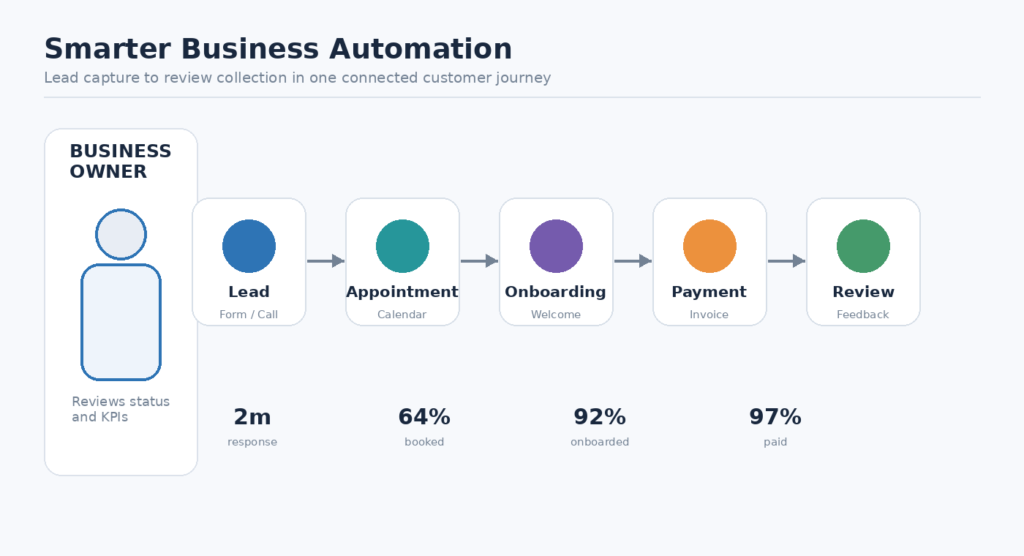
The 15 GoHighLevel Workflows at a Glance
Here are the fifteen workflows covered in this guide. Start with the two or three that fix your biggest bottleneck, then add the rest once they run reliably. If you want them built for you, see our GoHighLevel workflow automation service.
- Instant lead response: text and email every new form, chat or ad lead within seconds.
- Missed call text back: send an automatic text when a call goes unanswered.
- Lead routing and qualification: assign each lead to the right person by service, location or score.
- Appointment booking confirmation: confirm every booking with the details and a calendar link.
- Appointment reminders: remind customers before the visit with an easy way to reschedule.
- No show recovery: follow up with people who missed their appointment and offer a new time.
- Lead nurture sequence: send useful content to leads who are not ready to buy yet.
- AI FAQ auto reply: answer common questions instantly and hand complex ones to your team.
- Estimate and sales follow up: chase open quotes and proposals until you get an answer.
- Client onboarding: welcome new customers and collect forms and documents automatically.
- Review requests: ask happy customers for a Google review after a successful job.
- Repeat booking reminders: prompt customers when their next service or maintenance is due.
- Client reactivation: win back customers who have gone quiet with a timely offer.
- Payment reminders: send clear due date reminders for unpaid invoices.
- Internal task alerts: notify your team and create tasks when a lead or customer needs attention.
Why GoHighLevel Automation Is Transforming Service Businesses in 2026
Why GoHighLevel automation is transforming service businesses in 2026 becomes clear when teams replace scattered spreadsheets with one CRM and measurable customer journeys. Service businesses can trigger SMS automation, follow-up emails, task assignments, and pipeline updates immediately after a form submission. HVAC companies, electrical contractors, plumbing companies, restoration firms, and landscaping crews can standardize lead response without hiring administrative staff for every inquiry.

How Workflow Automation Speeds Up Small Business Growth
How Workflow Automation accelerates small business growth depends on connecting speed-to-lead with consistent sales follow-up. A workflow can notify a salesperson, send an immediate text, create an opportunity, and schedule follow-up sequences when a prospect enters the sales pipeline. Businesses should measure response time, booked appointments, qualified opportunities, and lead conversion weekly, then adjust filters and time delays according to performance.

GoHighLevel Workflows That Improve Lead Response
GoHighLevel workflows that improve lead response begin with lead capture from websites, Facebook lead forms, calls, and chat. A workflow trigger can assign ownership, send a helpful SMS, launch an FAQ auto-reply, and create a voicemail follow-up task. Keep the first message specific, identify the requested service, and provide one clear booking action so prospects receive useful communication rather than generic promotion.
Automations That Protect Your Team’s Capacity
Business Automations that protect team capacity remove repetitive tasks from staff schedules without removing human judgment. Use automated actions for tagging, internal notifications, appointment reminders, missed-call text-back, contact backup, and pipeline management. Filters should prevent duplicate messages, while time delays should reflect business hours and customer expectations. Review exception reports weekly so automation supports employees instead of creating hidden errors.
The Core Automation Use Cases for Agencies
The essential automation use cases behind agency automation include lead nurturing, appointment booking, customer onboarding, review collection, payment reminders, and client reactivation. Agencies can package these workflows for different service businesses while preserving each client’s offers, calendars, fields, and brand voice. Clear naming conventions and documented ownership make it easier to troubleshoot campaigns and demonstrate measurable business automation results.

Keep Client Contact Consistent Across Channels
Marketing agency workflows for consistent client contact should coordinate email, SMS, calls, and internal tasks through multi-channel communication. A campaign might send educational content after lead capture, pause when a conversation begins, and resume only when the prospect remains inactive. Agencies should define contact frequency, suppression rules, consent requirements, and exit conditions before launching nurture sequences for each audience.
Workflow Setup Choices That Scale
Workflow Setup choices that support scalable workflows require a simple architecture: one purpose per workflow, descriptive tags, controlled entry conditions, and documented completion criteria. Use snapshots to replicate proven configurations, but audit copied triggers, calendars, custom fields, and notifications before activating them. Test every path with sample contacts, including duplicates, replies, cancellations, and invalid phone numbers.
Build a GoHighLevel Setup for Stronger Lead Management
Build a proven GoHighLevel setup for stronger Lead Management by defining lifecycle stages before creating automations. Separate new, contacted, qualified, booked, won, lost, and reactivation opportunities, then connect each stage to appropriate tasks and messages. A clean CRM makes sales forecasting more reliable because managers can distinguish genuine pipeline movement from contacts that merely received marketing communication.

Organize Client Sub-Accounts and Lead Capture
How to organize client sub-accounts and Lead Capture starts with consistent account templates for forms, calendars, pipelines, tags, and permissions. Each sub-account should identify lead source, service interest, consent status, and assigned team member. Use a lead database cleanup routine to merge duplicates and confirm routing before advertising campaigns send new prospects into the system.
Trigger an Instant Response for Every New Lead
Workflow triggers for instant lead response should fire from a form submission, inbound call, chat message, Facebook lead forms entry, or appointment request. The first action can create an opportunity and alert the right salesperson; the next can send a concise confirmation with a booking link. Add a fallback task when the contact cannot receive SMS or email.
Use Conditional Branches for Tailored Onboarding
Conditional branches for tailored client onboarding let GoHighLevel distinguish customers by service, location, budget, or appointment type. One branch can send preparation instructions, another can request documents, and a third can alert an account manager. Use clear conditions and test each branch with realistic records before activating the workflow for paying customers.
Five GoHighLevel Workflows That Strengthen Your Sales Pipeline
Five GoHighLevel workflows that strengthen the Sales Pipeline include instant lead response, qualification, appointment booking, no-show recovery, and post-sale follow-up. Together, they connect sales activity with customer communication and reduce gaps between inquiry, conversation, proposal, and purchase. Managers should assign one owner to each stage and review conversion rates by source, salesperson, service, and response time.
Lead Paths for Different Service Businesses
Lead Management paths for service businesses should reflect real operational differences rather than forcing every prospect through one sequence. A plumbing company may prioritize emergency calls, while a landscaping crew may require estimates and seasonal scheduling. Use lead scoring, service tags, geographic filters, and availability rules to route prospects accurately, then stop promotional messages once a team member takes ownership.
Document Every Workflow Before You Launch It
Workflow Implementation practices for small business teams include documenting the trigger, audience, action, delay, owner, and success metric for every workflow. Start with one high-volume bottleneck, such as missed-call response, and compare results before and after launch. Train staff to update opportunity stages consistently, because automation cannot produce trustworthy reporting from incomplete sales data.
Workflow Examples for Marketing Agencies
The ultimate workflow examples for marketing agency workflows combine reusable templates with client-specific decisions. Agencies can offer lead capture, appointment booking, sales follow-up, customer onboarding, review requests, and payment collection as a connected service package. Each workflow should have a documented purpose, entry rule, exit rule, test contact, and reporting view so clients understand the value delivered.
Seven HighLevel Workflows for Reliable Agency Automation
Seven HighLevel workflows that create reliable agency automations can cover speed-to-lead, nurture sequences, appointment reminders, missed-call recovery, onboarding, review requests, and client reactivation. HighLevel teams should use consistent naming, version notes, and approval checks before publishing changes. These safeguards make it easier to support multiple accounts while preserving reliable customer communication.
Automated Appointment Reminders
Automated workflows for appointment reminders should confirm the booking immediately, send preparation instructions before the meeting, and provide a concise reminder at an appropriate interval. Include rescheduling instructions and stop messages after cancellation. Calendar integration must be tested for time zones, double bookings, canceled events, and changes made directly inside the calendar.
Use AI to Speed Up Follow-Up Safely
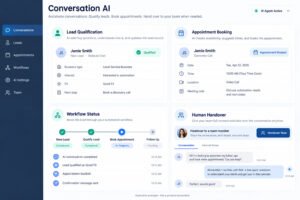
AI Services and marketing tools for faster follow-up can classify inquiries, suggest replies, and identify common questions without replacing responsible staff review. Conversation AI may handle basic availability or FAQ requests, while complex pricing and urgent service issues should route to a human. Monitor accuracy, escalation rates, consent, and customer satisfaction before expanding AI solutions.
How CRM Data and Automation Work Together
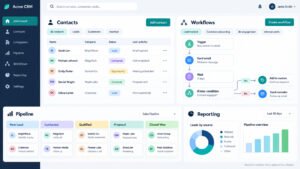
How Business Automation connects CRM Services and Automation Services is best understood as a shared operating system for customer journeys. CRM records provide context, while automation executes approved actions across sales, service, marketing, and finance. Webhooks can pass qualified events to external systems, but teams should log failures, protect personal data, and define which platform remains the source of truth.

Train Your Team to Set Up Workflows Confidently
GoHighLevel training for confident Workflow Setup should teach staff to map a customer journey before opening the workflow builder. Learners should practice triggers, actions, filters, delays, branching, testing, permissions, and rollback procedures. A short internal playbook with screenshots and troubleshooting examples helps new users make safe changes without depending on one technical specialist.
Compare the Cost of Automation with the Time It Saves
Cost Comparisons for practical Business Automations should include software, messaging, setup, maintenance, training, and opportunity cost. Compare the monthly expense with hours saved, faster lead response, additional booked appointments, and reduced missed payments. Whether implementation is completed internally or by an outside specialist, require a test plan, ownership agreement, documentation, and measurable acceptance criteria.
Automation for Onboarding, Retention and Revenue
Powerful automation use cases for onboarding, retention, and revenue connect the period after purchase to long-term customer value. Send welcome instructions, collect required information, schedule milestones, request feedback, and identify renewal opportunities. Subscription businesses can support recurring revenue with payment reminders and service updates, while local providers can encourage repeat bookings through timely, relevant customer communication.

Which Workflows Deliver the Fastest Gains?
Which Workflow Automation ideas deliver the fastest gains? Start with workflows tied to frequent, measurable delays: missed-call response, new lead routing, appointment reminders, unpaid invoices, and review requests. These processes usually require limited creative content and produce clear baseline metrics. Rank opportunities by volume, revenue impact, staff time, implementation effort, and customer risk before choosing a pilot.
Client Onboarding Journeys That Make the Next Step Obvious
Client onboarding journeys for professional Business Services should make the next step obvious after purchase. A workflow can send a welcome email, intake form, scheduling link, document checklist, and internal handoff notification. Use completion tags to prevent duplicate reminders, escalate overdue tasks, and provide the account team with a visible record of customer progress.
Workflows That Encourage Repeat Bookings
GoHighLevel workflows that encourage repeat bookings can send maintenance reminders, usage-based recommendations, seasonal offers, and satisfaction checks. Trigger the sequence from completed appointments or service intervals, then exclude customers with unresolved complaints or overdue balances. Personalize the message with the last service and a direct calendar link rather than sending broad promotional content.
Real Workflow Examples from Growing Service Businesses
Real-world workflow examples from growing service businesses show how modest process improvements compound. An HVAC team can route emergency inquiries immediately, an electrical contractor can automate estimate follow-up, and a restoration firm can coordinate updates after inspection. A landscaping crew can use seasonal reminders and rebooking prompts. Each example should begin with a baseline and a defined operational constraint.

Measure How Fast You Respond to Every Lead
Business Transformation through responsive lead management occurs when every inquiry receives a timely, relevant next step and every employee sees the same status. Measure median lead response, contact rate, qualification rate, booked appointments, and sales cycle length. Review results by channel because Facebook ads, organic forms, calls, and referrals often require different routing and message timing.
Workflows for Reviews, Reactivation and Payments
HighLevel workflows for reviews, reactivation, and payments can protect both reputation and cash flow. Send review requests after a successful interaction, suppress them after negative feedback, and route concerns to a manager. Use client reactivation and list reactivation campaigns for inactive contacts, while payment collection and payment reminders should provide clear due dates and secure next steps.
How to Maintain Your GoHighLevel Workflows
How to maintain GoHighLevel workflows and plan the next breakthrough by scheduling monthly audits, reviewing failed actions, and retiring outdated campaigns. Check message consent, links, calendars, custom fields, ownership rules, and reporting accuracy. Compare workflow performance against business goals, then prioritize the next improvement instead of adding automation simply because a new feature is available.

A Practical Workflow Roadmap for 2026
A practical workflow roadmap for 2026 begins with process mapping, baseline measurement, and stakeholder approval. In the first phase, document the current customer journey; next, build one pilot; then test edge cases, train users, and monitor outcomes for several weeks. Expand only after the workflow proves reliable and the team understands how to intervene manually.
Track Performance with Test Records and a Change Log
Resources for refining workflow automation performance include platform documentation, internal process maps, test records, delivery reports, call recordings, and customer feedback. Create a controlled test library for new triggers and branches, and maintain a change log for every revision. Regularly compare delivered messages, response times, booked appointments, and revenue against the original baseline.
Know When and How to Escalate Support Issues
Clear support pathways should make escalation easy when account access, billing, compliance, or platform reliability issues arise. Record the account identifier, workflow name, trigger time, error message, and recent changes before requesting help. Internal owners should remain available for customer-facing decisions while technical teams investigate system behavior.
Where to Find Good GoHighLevel Learning Resources
Good help articles and community discussions can help teams compare implementation patterns and discover practical troubleshooting ideas. Prioritize resources that explain triggers, permissions, testing, reporting, and compliance rather than promising effortless growth. Validate community suggestions in a test account before applying them to live client workflows or customer communication.
Organize Team Training by Topic
Continued GoHighLevel training should organize learning around CRM foundations, lead capture, sales pipeline management, messaging, calendars, onboarding, payments, reputation management, and reporting. Assign each team member a focused learning path, then require a practical exercise such as building a tested workflow with documented entry and exit conditions.
Turn Team Questions into Tested Solutions
Questions from your team should support continuous improvement by capturing recurring questions and tested solutions. Ask team members to describe their trigger, intended outcome, failure point, and business context. Review suggestions for privacy, consent, and reliability before incorporating them into production automation or client-facing processes.